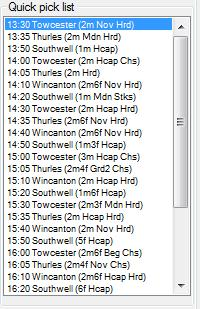
The Quick Pick List is a filtered list of markets from the main Markets Tree which provides a quick way of accessing markets.
There are number of ways to put markets in the Quick Pick List, see Loading Quick Pick List.
You can remove a market from the Quick Pick List by highlighting the specific market and then pressing delete on the keyboard.
You can delete a block of markets from the list by clicking on the first market that you wish delete whilst holding down the Ctrl key on your keyboard.
You should then see the market name highlighted with a green background.
You can highlight other markets similarly by continuing to hold down the Ctrl key and clicking on them one at a time.
Or you can hold down the shift key and click on the bottom of the block and you should see all the markets in between go green.
Then right click anywhere where it is green and select “Delete market” option.
All the markets with the green background will then be deleted from the list.
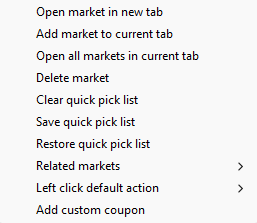
Also from the dropdown menu you can clear the entire quick pick list.
| Right clicking on the Quick Pick List will open a context menu with a number of options as pictured below. |
 |
Additionally you can make the markets that you have in your list auto select at specific times.