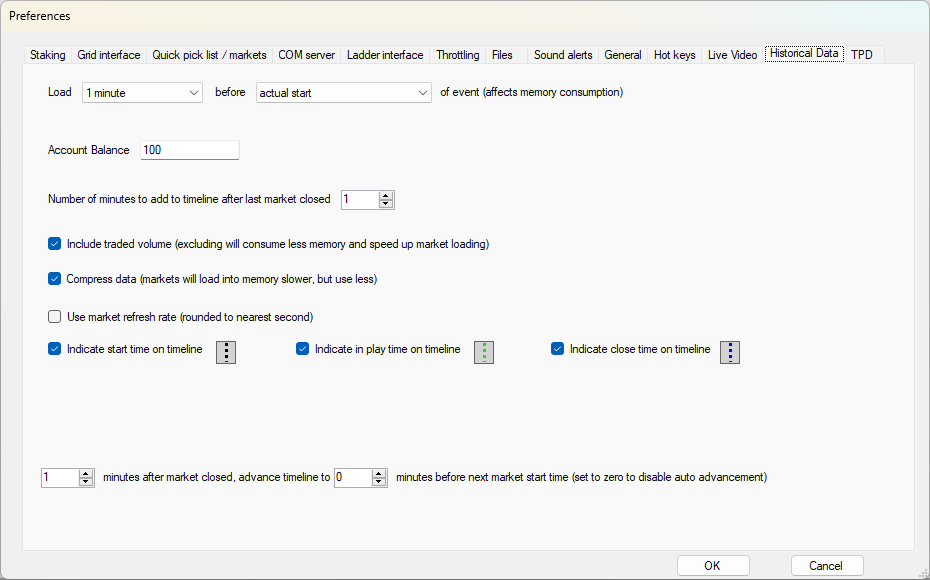
Load ? before ? of event
Select how much price data you want to load either before the scheduled start time or the actual start time of the first market in the Quick Pick List.
Account balance
Set how much money you want to start with for the virtual wallet.
Number of minutes to add to timeline after last market has closed
Set the number of minutes to add to the timeline after the last market has closed.
Include traded volume
Set this option to include traded volume when loading the historical data.
Compress data
Set this option to compress the historical data before it is loaded.
It may take slightly longer to load but will use less memory.
Use market refresh rate
By default the price data is refreshed at a frequency of 1 second regardless of the refresh rate set in Betting Options but you can use this option to use the Betting Options rate.
You can therefore have a longer refresh rate if that is something you would like for your testing.
If you tick 'Full Stream' the software will simulate the effect of that where prices are updated as and when they change but will not be any quicker than 1 second as that is refresh frequency of the underlying historical data.
Indicate start time on timeline / Indicate in play time on timeline / Indicate close time on timeline
Use these options to include or exclude the markers on the timeline.
? minutes after market closed, advance timeline to ? minutes before next market start time
Use this option to skip parts of the timeline to speed up the progression.
However if you manually move the timeline using the slider then this option will be ignored until the timeline is stopped and restarted.